
Download Adobe Captivate (64-bit) – eLearning, responsive design, course creation, instructional design, multimedia content, interactive learning, training tools, educational software, eLearning authoring, learning management
Overview
Adobe Captivate (64-bit) is a specialized eLearning authoring tool designed for instructional designers, educators, and corporate trainers seeking to create dynamic, responsive learning experiences. Released in July 2017, the software enables users to develop interactive courses that adapt seamlessly across various devices, from desktops to tablets and smartphones. Its core purpose lies in streamlining the creation of multimedia-rich content while ensuring accessibility and engagement for modern learners. The application addresses the growing demand for mobile-friendly training materials by offering tools that transform outdated, non-responsive courses into contemporary formats.
Target users include academic institutions, corporate learning departments, and independent educators who require a robust platform for building scalable training programs. The software’s integration with Adobe’s broader ecosystem, including Typekit for font management, enhances branding consistency and visual polish in course materials. Real-world use cases range from onboarding new employees to delivering compliance training and academic modules. As part of the digital education landscape, Adobe Captivate fills a critical gap in the eLearning authoring market by combining intuitive design features with powerful backend capabilities. Although the developer did not provide additional technical details, its release marked a significant step forward in responsive course development.
Key Features & Functionality
- Responsive eLearning Design: Courses created in Adobe Captivate automatically adjust layout and content based on screen size, ensuring optimal viewing across desktops, tablets, and smartphones. This feature is essential for modern learning environments where users access content on diverse devices.
- Fluid Boxes Technology: This intelligent layout system automatically aligns and spaces objects within a course, using available white space to maintain visual harmony. Designers can reduce manual adjustments, significantly cutting down authoring time and minimizing layout inconsistencies.
- Legacy Course Transformation: Users can convert non-responsive courses originally built in Adobe Captivate 8 and 9 into fully responsive formats. This capability allows organizations to modernize existing training libraries without re-creating content from scratch, preserving investment in prior materials.
- Extensive Asset Library: With over 75,000 free eLearning assets—including interactive quizzes, animations, and multimedia elements—users can accelerate course development and enhance learner engagement without external sourcing.
- Adobe Typekit Integration: Access to a curated collection of professional fonts allows for consistent branding and improved typographic quality across courses. This integration supports both aesthetic appeal and organizational identity in training materials.
For example, a corporate trainer can use Fluid Boxes to quickly restructure a lengthy training module, ensuring that text and images remain readable on a mobile screen. Similarly, an educator can import an older course and apply the transformation feature to make it accessible on student tablets. These capabilities collectively reduce development time while increasing the quality and reach of educational content.
Interface, UX & Performance
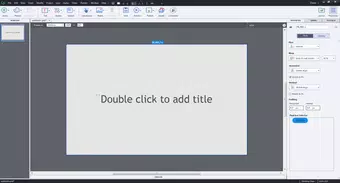
The interface of Adobe Captivate (64-bit) is structured around a traditional desktop application layout, featuring a timeline-based editor, asset panel, and property inspector. Navigation is primarily mouse-driven, with clearly labeled toolbars and contextual menus. The visual style is functional and aligned with Adobe’s design language, emphasizing clarity and workflow efficiency. Users familiar with other Adobe Creative Suite applications will find the layout intuitive and easy to navigate.
Although the developer did not list formal performance metrics, the application’s 1.5 GB file size suggests it is optimized for modern Windows systems with sufficient RAM and processing power. Responsiveness appears to be consistent during typical authoring tasks such as drag-and-drop editing and asset insertion. Stability is expected to be reliable for standard use cases, particularly on systems meeting recommended specifications. However, compatibility with older Windows versions or low-end hardware was not disclosed. Users are advised to ensure their system meets the minimum requirements for smooth operation, though specific details were not provided.
Platform Compatibility & Technical Requirements
Adobe Captivate (64-bit) is designed exclusively for the Windows operating system. The software is compatible with Windows platforms, though the exact version requirements were not specified by the developer. The application has a file size of 1.5 GB, which reflects its comprehensive feature set and asset library. Users should ensure their system has adequate storage space and supports 64-bit architecture to run the application.
While the developer did not specify minimum OS requirements, the 64-bit designation indicates that it is intended for modern Windows environments. Compatibility with older versions of Windows, such as Windows 7 or earlier, was not confirmed. Similarly, no information was provided regarding processor speed, RAM, or graphics support. Users are encouraged to verify system compatibility before installation. The software is available at no cost, making it accessible for educational and training institutions seeking high-quality eLearning authoring tools.
Pros and Cons
Pros
- Supports responsive course design for multi-device accessibility.
- Includes Fluid Boxes for automated, intelligent layout alignment.
- Enables transformation of legacy courses into modern, responsive formats.
- Offers a large library of free, ready-to-use eLearning assets.
- Integrates with Adobe Typekit for professional font customization.
- Free to download and use, reducing entry barriers for educators and trainers.
Cons
- Platform limited to Windows; no support for macOS or Linux.
- Specific system requirements were not disclosed.
- Release date is from 2017, indicating it may lack newer features found in current eLearning tools.
- Not a mobile app; intended for desktop authoring, not on-the-go content creation.
- May require additional training for users unfamiliar with eLearning authoring workflows.
FAQ
Is Adobe Captivate (64-bit) safe to download and install?
Yes, the software is developed by Adobe Systems Incorporated, a trusted provider of creative and productivity tools. As long as it is downloaded from official or verified sources, it is secure to install.
Can I use Adobe Captivate to create mobile-friendly courses?
Yes, the application supports responsive design, allowing courses to adapt automatically to different screen sizes, including smartphones and tablets.
Is Adobe Captivate (64-bit) free to use?
Yes, the software is available at no cost. However, users should confirm the current licensing terms from official sources.
Does Adobe Captivate support older versions of Windows?
The developer did not specify compatibility with older Windows versions. It is recommended to use the software on modern Windows systems with 64-bit architecture.
Can I update Adobe Captivate (64-bit) to a newer version?
As of the provided data, no update information is available. Users should check Adobe’s official website for the latest version and release notes.
Final Thoughts
Adobe Captivate (64-bit) remains a powerful tool for creating responsive, interactive eLearning content, particularly for organizations with existing training libraries that need modernization. Its Fluid Boxes and legacy course transformation features significantly reduce the time and effort required to produce high-quality, device-agnostic courses. While the software is limited to Windows and has not been updated since 2017, its core functionality continues to serve instructional designers and educators effectively.
For those in the education or corporate training sectors who prioritize responsive design and content reuse, Adobe Captivate offers a compelling value proposition. Its free availability enhances accessibility, making it a practical choice for institutions with limited budgets. Despite its age, the platform’s focus on usability, asset integration, and cross-device compatibility ensures it remains relevant in the evolving eLearning landscape.
Download Adobe Captivate (64-bit) now


